
Best Tips To Securing Your WordPress Website
At Agile, we appreciate the vital importance of WordPress website security for businesses of all sizes. Drawing on over twenty years’ experience in digital solutions, our team is dedicated to keeping your website robust against today’s ever-evolving online threats.
In this comprehensive guide, we will walk you through five essential security tips to ensure the safety of your website. By implementing these measures, you can safeguard your WordPress site and minimise the risk of hacks or compromises.
Introduction
WordPress is renowned as one of the most popular content management systems (CMS) for creating websites and blogs. Whether you are starting from scratch or utilising pre-made themes, WordPress offers a user-friendly interface, an extensive plugin library, and a range of customisation options. Its versatility makes it an ideal choice for individuals and businesses alike.
WordPress caters to both small businesses and enterprise clients, providing scalability, flexibility, and SEO-friendly features. With powerful functionalities like media libraries, content previews, page revisions, and user management systems, WordPress offers a comprehensive platform for website creation.

Source: WordPress.com
So, if you’re looking for an easy way to build a website, WordPress is a great option. Many web hosting providers offer a one-click installation of WordPress, making it quick and easy to get started. Additionally, WordPress’s open-source nature and cost-effectiveness make it appealing for small businesses operating on a budget.
Even non-technical users find WordPress’s back-office administration interface intuitive and user-friendly.
While commonly associated with small businesses and personal bloggers, WordPress is also scalable and flexible enough to serve enterprise clients. Its SEO-friendly nature, coupled with powerful features such as media libraries, content previews, page revisions, and user management systems, make it an attractive choice for businesses of all sizes.
If you’re a small business owner looking for a new website, you may be wondering whether to buy a ready-made WordPress theme or go for custom theme design and development. While ready-made themes can be a quick and easy option, business customers often opt for custom themes to get more granular control over the appearance and code. This can be a great option if you want your website to stand out from the crowd.
If you already have a website for your business, your company website has likely been created using this content management system (Given that WordPress now powers over 35% of all websites on the internet).
Read also: How to Optimise WordPress for Financial Companies: What CMOs Actually Need
How to check if my website is using WordPress
If your company’s website was developed by an external agency and you’re unsure about the underlying technology, you can determine if it utilises WordPress by following these steps:
- Go to the BuiltWith site
- Enter your website URL
- Read the report and see what technology your site uses
- Check the CMS section and see if the WordPress name appears

Why should I keep my WordPress websites up to date?
As new security vulnerabilities are discovered every day, it is important to make sure your site is up-to-date with the latest version of WordPress. This will ensure that your site is as secure as possible.
Remember, your website serves as a critical touchpoint for your business, often forming the first impression on potential customers. A hacked site can cause significant disruptions, even with backup policies in place. Proactive measures to prevent hacks are essential, as recovery can be time-consuming.
When a website is hacked, the changes may not be immediately noticeable. However, there might be subtle signs such as unusual content or alterations to the site’s appearance. Injected malicious code can generate indexed links visible on Google searches.
Therefore, it’s wise to search for your site using the “site:yoursite.com” command. Strange URLs appearing in the results may indicate a hacked site. Hacking incidents can also result in content changes or visitor redirection to other websites. Taking prompt action upon suspecting a hack is vital to minimise the damage.
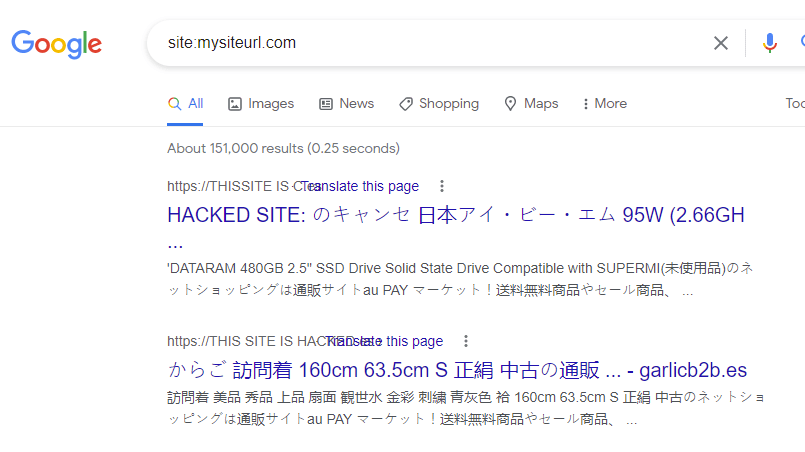
In the event of a compromised website, other sites on the same server can be affected, potentially leading your hosting provider to suspend your account. At the very least, restoring the situation will require significant time and effort. While no system is impervious to hacking, WordPress benefits from a large community committed to promptly fixing vulnerabilities. Frequent updates are released, addressing minor bugs, improving performance, and crucially, strengthening security. By diligently maintaining and updating your WordPress platform and server, you can enhance your website’s security.
How to update WordPress?
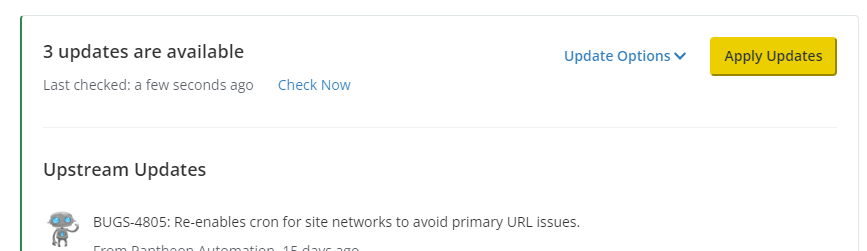
There are two ways you can update WordPress, the manual way and the automatic way.
The manual way is more time-consuming, but it can also be safer. It allows you to review and validate the new version before you release it to your live environment. With this, you ensure your site doesn’t crash when updating.
Ideally, you should follow an industry-standard continuous integration workflow to manage your WordPress updates. This typically involves creating and maintaining a development environment, where updates are first made and any bugs are fixed. Once the development environment is stable, changes can be deployed to a testing environment. Ideally, a copy of the live database should be brought into the testing environment to ensure accuracy.
The Five Foundations of Secure WordPress Sites
If you’re running a WordPress website, it’s important to take steps to keep it secure. By following these tips, you can help protect your site from hackers and other security threats.
1. Stay Ahead With Updates
Ensure WordPress core, plugins, and themes are all up-to-date. Enable automatic updates where safe, but always test significant changes on a staging site first. This helps confirm compatibility and avoids unwelcome surprises when going live.
Pro tip: Maintain a changelog of all updates and generate regular backups prior to every change.
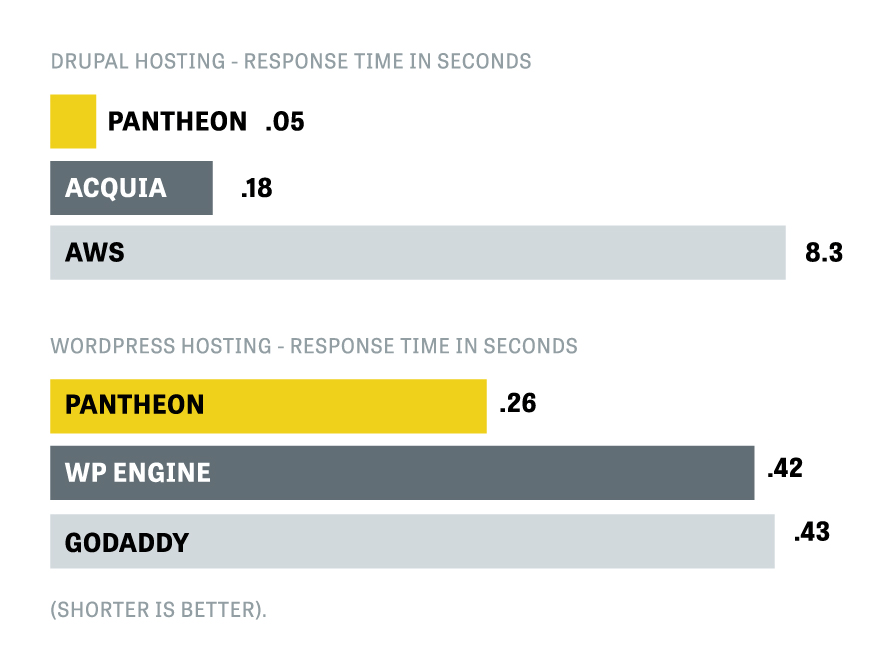
2. Choose a Reliable Hosting Provider
Performance and security start with your web host. Opt for providers offering managed WordPress hosting, daily automated backups, staging environments, integrated caching (e.g., Redis, object cache), and active security monitoring. Pantheon is a strong choice, but compare options based on uptime guarantees, support, and backup retention policies.
Ensure your host keeps PHP and database versions current, and review your hosting configuration after every major WordPress update.
3. Secure With HTTPS
Install an SSL certificate to encrypt traffic between your site and visitors. Providers like Cloudflare and Let’s Encrypt offer free, modern SSL certificates that are easy to implement. Browsers now flag unencrypted sites—don’t risk appearing untrustworthy to your users.
4. Use strong passwords
Adopt unique, complex passwords for all administrator and user accounts. Mandate two-factor authentication (2FA) for dashboard and hosting control panel logins. Limit admin access to necessary personnel and remove unused accounts promptly.
Consider using password managers to enforce strong credential policies.
5. Deploy Security Plugins Thoughtfully
Security plugins add essential hardening: firewall rules, rate limiting, file change detection, and login obfuscation. Recommended options include:
- Wordfence Security
- Sucuri Security
- All In One WP Security & Firewall
Configure plugins to disable theme and plugin editor access, limit login attempts, rename the login form URL, and enable real-time monitoring for suspicious activity. Regularly audit plugin and theme lists and remove unused ones to minimise your attack surface.
Advanced Steps for Engineers
- Regularly review and log server access for anomalies.
- Version-control your codebase with Git. Deploy changes via CI/CD pipelines and use environment parity (development, staging, production) for rigorous testing.
- Follow WordPress Coding Standards for all PHP, JS, and CSS.
- Enable file integrity monitoring and daily malware scans.
- Secure wp-config.php and sensitive directories using appropriate file permissions (ideally, deny web access to configuration files).
How Agile can help
A well-maintained site builds trust. Our maintenance programmes focus on continual security, performance tuning, routine updates, and proactive incident response, so you remain focused on growing your business.
Should you need a hand with bespoke security audits or managed WordPress hosting, our award-winning team is ready to assist.

Our commitment to excellence is underscored by our recognition as Top WordPress Developers in the United Kingdom for 2026.
Frequently Asked Questions
What are the biggest WordPress security threats in 2026?
The most common threats include brute force login attacks, exploits targeting outdated plugins and themes, SQL injection through vulnerable forms, cross-site scripting (XSS), supply chain attacks through compromised plugin updates, and increasingly sophisticated AI-powered phishing targeting admin credentials. Keeping WordPress core, themes, and plugins updated remains the most effective defence.
How often should I update my WordPress plugins?
Apply security updates immediately — these patch known vulnerabilities that attackers actively exploit. Feature updates can be applied weekly or fortnightly after checking compatibility. Always back up your site before updating, and test updates on a staging environment first if your site generates significant revenue or traffic.
Is WordPress secure enough for financial services websites?
Yes, when properly configured and maintained. WordPress powers major financial institutions worldwide. Security requires proper hosting with server-level firewalls, regular updates, strong authentication (two-factor), a web application firewall plugin, regular security audits, SSL encryption, and adherence to data protection regulations. The platform itself is secure — vulnerabilities typically come from poor maintenance or insecure plugins.
What WordPress security plugins do you recommend?
Wordfence provides comprehensive protection with firewall, malware scanning, and login security. Sucuri offers excellent website monitoring and DDoS protection. iThemes Security (now SolidWP) provides good hardening features. For most professional services sites, one comprehensive security plugin combined with regular updates and strong hosting provides robust protection.

Related
Articles
![What Is Entity-Driven SEO? A Practical Guide for Professional Services [2026]](https://www.agiledigitalagency.com/wp-content/uploads/2026/03/What-Is-Entity-Driven-SEO-1.avif)